
How to Create Moving Chuseok Cards with a Single Photo Using ChatGPT and KakaoTalk
With Chuseok approaching, people are increasingly using AI tools like ChatGPT and KakaoTalk to create personalized moving video cards from single photos.
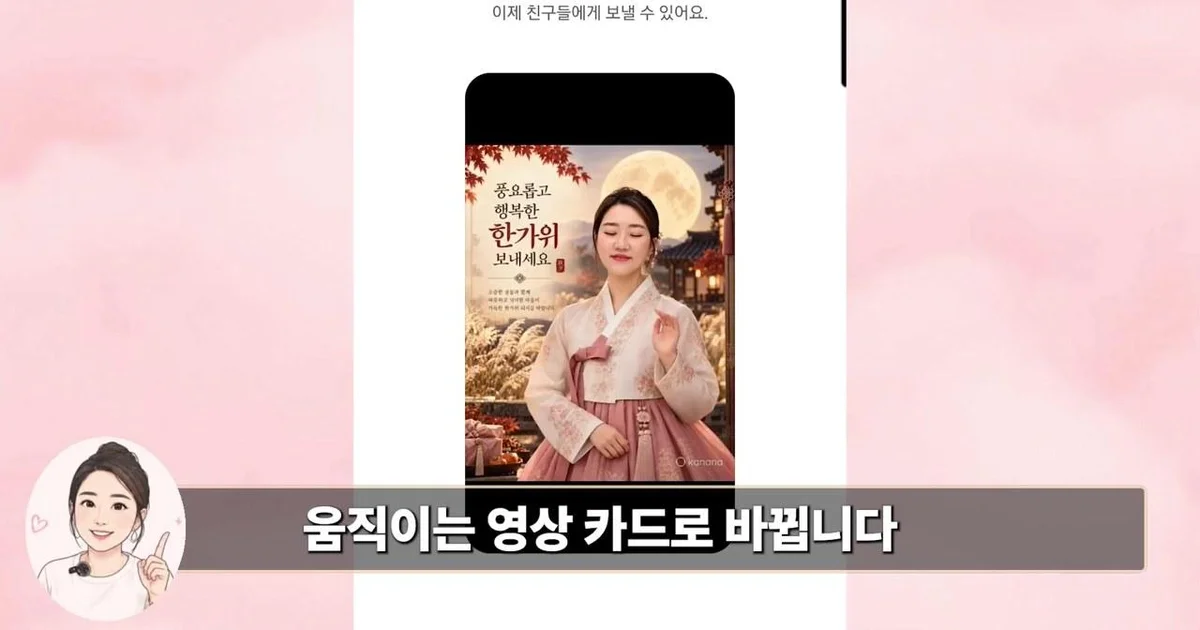
With the upcoming Chuseok, an increasing number of people want to convey special feelings with a single photo instead of ordinary greetings. According to a video recently released on the 'Ttoksuni Eunssaem' YouTube channel, anyone can easily create everything from a card featuring themselves wearing Hanbok to a moving video card where the person in the photo directly delivers a greeting, by utilizing ChatGPT and the AI features of KakaoTalk.
Dressing Your Photo in Hanbok and Creating a Chuseok Atmosphere with ChatGPT
The first thing to do is to change the atmosphere of the photo using ChatGPT. The video recommends preparing a photo where the face is clearly visible from the front, rather than a photo where the face is too small or obscured. Once the photo is ready, you can upload it by clicking the plus (+) button to the left of the ChatGPT input window and then enter a command describing the desired atmosphere.
There is no need to write difficult commands yourself; you can copy and use pre-prepared phrases. The video presented three different types of commands as examples, such as 'appearing in Hanbok under a full moon', 'greeting in a Hanok courtyard', and 'a warm holiday card with Songpyeon and Bojagi'. If the generated result differs from the actual face, you can request, "Make the face look a bit more like the original photo," or request modifications such as, "Change the greeting to 'Have a healthy and happy Hangawi'." The completed image can be saved to your phone for use.
Converting Photos into Moving Videos Using KakaoTalk AI Features
Once the static image is complete, it is time to turn it into a moving video card. You can do this by utilizing the features of KakaoTalk, which you use every day, without any separate video editing programs. First, open the generated image in your phone's gallery, press the 'Share' button, and send the photo to your 'Me' chat room in KakaoTalk.
When you click the photo sent to your chat room with yourself, the 'Make with AI' menu appears at the top right. From here, you can enter the 'Kanana Video' menu and select the 'Moving Photo' template. Using this feature, the AI will use a single photo to create a video where the person moves naturally for about 5 seconds. Once video production begins, the task proceeds automatically even if you close the screen.
Creating 'Family Chuseok Cards' and 'Speaking Video Cards' Even Without Family Photos
Even if you do not have a photo where the whole family is gathered together, you can create a card that looks as if the whole family is together through ChatGPT. After uploading additional individual photos of family members, such as children or grandchildren, to ChatGPT, you can enter a command for a family Chuseok card. Then, based on the photos taken in different locations, the AI will complete a family Chuseok card that looks as if everyone gathered in one place wearing Hanbok.
Taking it a step further, there is a way to make the person in the photo directly deliver a greeting with their voice. This method utilizes Google's Gemini. After uploading the previously created Chuseok card to Gemini, enter a command describing how the person in the photo should move and what they should say, and a video will be generated where the person in the photo directly says, "Have a joyful Hangawi." However, since Gemini's video generation feature is currently provided to paid users, free users have the alternative of utilizing Google's 'Flow' feature.

Comments 0